Google Gemini Nano Banana: The Best AI Image Editing Tool of 2025? 7 Amazing Features
Do you spend hours editing photos? Do you wish you could just describe your idea and watch your images magically transform? If so, Google has launched a revolutionary tool just for you. Introducing Google Gemini Nano Banana, an AI tool poised to change the world of photo editing forever.
This powerful feature was recently teased by Google CEO Sundar Pichai with banana emojis in a tweet, and now it’s finally here. Its official name is ‘Gemini 2.5 Flash Image,’ but it’s known by the codename ‘Nano Banana.’ Let’s dive into everything you need to know about this amazing tool.
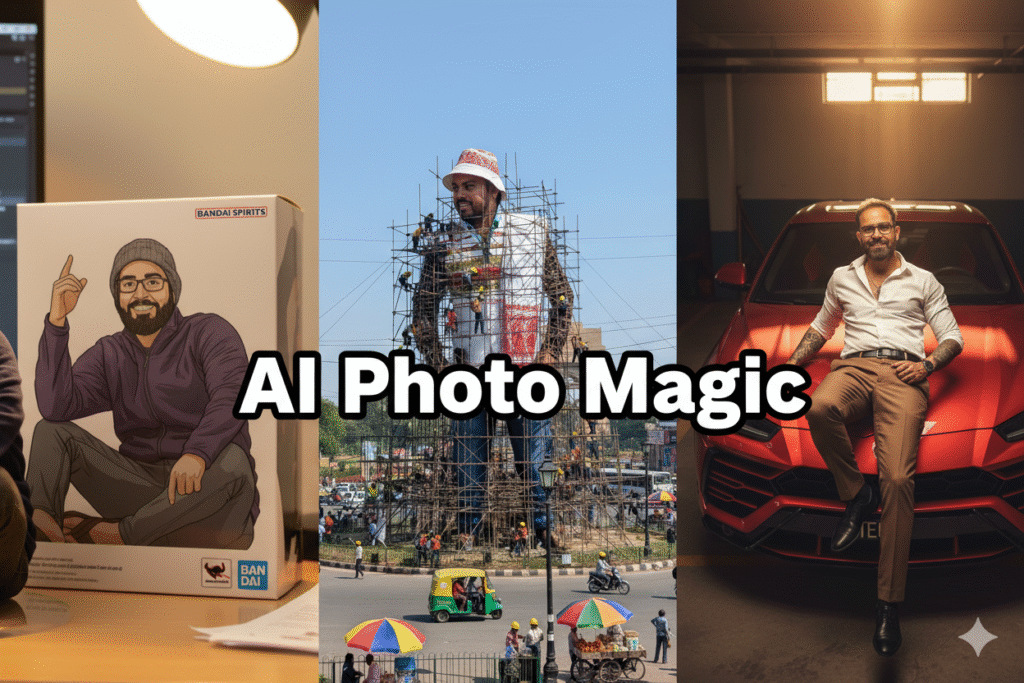
Image Alt Text: AI image editing performed with the Google Gemini Nano Banana tool.

What is Google Gemini ‘Nano Banana’?
Google Gemini Nano Banana isn’t a separate app but a state-of-the-art AI image editing and generation model built directly into Google Gemini. This model understands text prompts (written instructions) to make incredible changes to your pictures.
This goes far beyond applying filters or adjusting brightness. The tool understands the context of your photos and makes edits that were previously only possible with professional software.
7 Most Amazing and Secret Features of Nano Banana
The true power of Google Gemini Nano Banana lies in its features. Let’s take a look at its 7 most incredible capabilities:
- Character Consistency: This is its most magical feature. You can upload a photo of a person or a pet and then place them in different outfits, backgrounds, or scenarios, and their face and identity will remain perfectly consistent in every image.
- Image Blending: You can now merge two or more photos to create a single, coherent new image. For example, combine separate photos of you and a friend to create a group photo where you appear together.
- Prompt-Based Editing: All you have to do is describe the change you want in text. For instance, “change this blue shirt to red” or “add the Eiffel Tower to the background,” and Gemini will do it for you.
- Multi-Turn Editing: You can make step-by-step changes to the same image. First, change the background, then add furniture, and then change the wall color—Gemini will remember the context of each command.
- Design Mixing: This feature allows you to apply the style or texture from one image onto another. Imagine applying a floral pattern to your dress with a simple command!
- Easy Background Changing: Removing or replacing the background of any photo is now child’s play. Whether you need a studio backdrop or a mountain landscape, it’s possible with just one prompt.
- Adding or Removing Objects: Want to remove an unwanted person or object from your photo? Or perhaps add a coffee cup to a table? Nano Banana can perform this task in seconds.
How to Use Nano Banana?
Using this powerful tool is incredibly simple. The feature is available directly within the Gemini app.
- Just visit the Gemini app or website.
- Upload any photo of your choice.
- Write a text prompt describing the change you want.
- Watch the AI magic happen!
All images created by Google are marked with a watermark, identifying them as AI-generated.

Who Benefits Most from This?
This tool is useful for everyone, but for some, it will be a complete game-changer:
- Content Creators & Social Media Influencers: For creating stunning thumbnails and posts.
- Designers & Marketers: For quickly creating product mockups and advertisements.
- Everyday Users: For making their personal photos more fun and creative.
Is This the Future of Photo Editing?
Google Gemini Nano Banana has proven how simple and powerful AI can make photo editing. This tool democratizes complex editing tasks, bringing them within everyone’s reach. For more detailed information, you can read Google’s official AI for Developers Blog.
Without a doubt, this is just the beginning, and we will see even more advanced AI editing tools in the future. What are your thoughts on this new tool? Let us know in the comments!