
Want to create truly viral images? The Google Gemini Nano Banana model is the ultimate tool for turning your photos into stunning, shareable art. In the fast-paced world of social media, standing out is everything, and this powerful AI makes it easier than ever. Forget endless editing – with the right prompts, you can achieve incredible results instantly.
Whether you want to see yourself as a detailed collectible, a majestic monument, or a high-fashion icon, the prompts in this guide will help you leverage the Google Gemini Nano Banana model to bring your vision to life. We’ve curated 5 incredibly engaging prompts to give your Instagram feed a serious boost.
Why Use the Google Gemini Nano Banana for Viral Photos?
The magic of the Google Gemini Nano Banana model in photo generation lies in its ability to take a simple idea and execute it with incredible detail and realism. You don’t need to be a Photoshop expert or hire a professional photographer. With just a descriptive prompt, this tool can:
- Create unique content: Generate images that no one else has.
- Achieve specific aesthetics: Easily apply styles like “hyper-realistic,” “cinematic,” or “billionaire vibe.”
- Save time and resources: Get stunning visuals without elaborate setups.
- Boost engagement: Novel and high-quality images created with the Google Gemini Nano Banana naturally attract more likes, shares, and comments.
This is your secret weapon for capturing attention and making your Instagram profile unforgettable.
5 Viral Prompts for the Google Gemini Nano Banana Model
Ready to see yourself in a whole new light? Here are five dynamic prompts designed to get you those viral Instagram photos.
1. The Commercial Figurine: Desk Edition
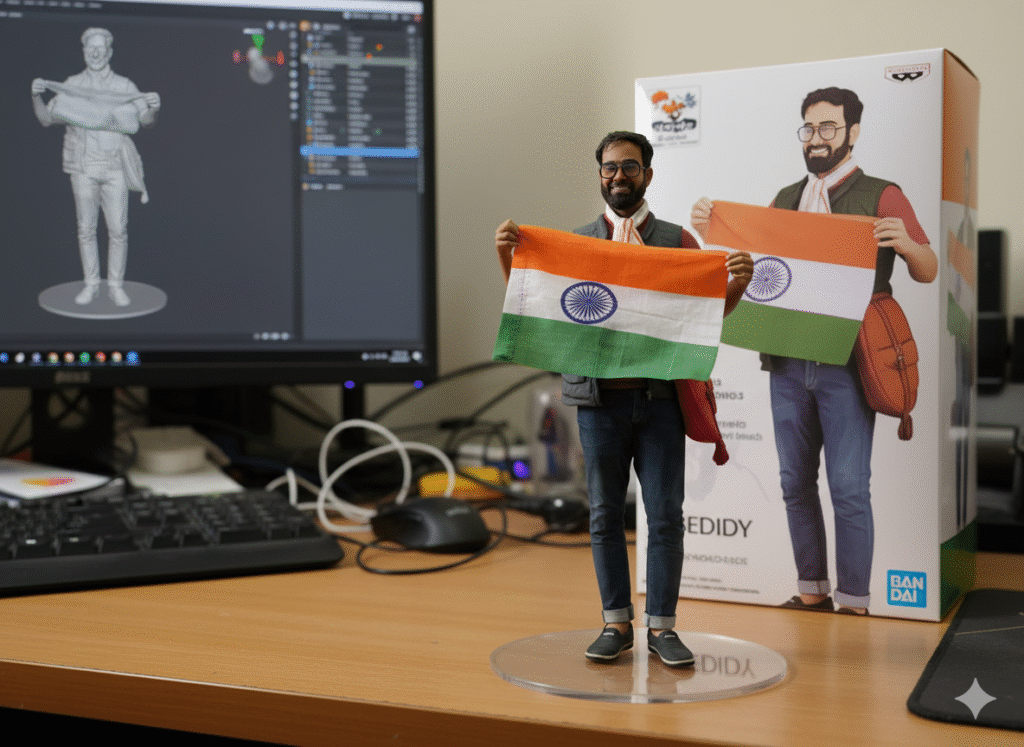
Imagine yourself as a meticulously crafted collectible. This prompt, when used with the Google Gemini Nano Banana model, transforms a given photo into a 1/6 scale commercial figurine, complete with packaging and a realistic setting.
The Prompt: “Create a 1/6 scale commercialised figurine of the characters in the picture, in a realistic style, in a real environment. The figurine is placed on a computer desk. The figurine has a round transparent acrylic base with no text on the base. The content on the computer screen is the ZBrush modelling process of this figurine. Next to the computer screen is a BANDAI-style toy packaging box printed with the original artwork. The packaging features two-dimensional flat illustrations.”
Why it’s viral: Collectibles are huge online! Seeing a realistic version of yourself as a highly detailed figurine is incredibly shareable. The Google Gemini Nano Banana model excels at creating this kind of detailed, contextual image.
2. The Colossal Statue: Islamabad Landmark
Become a monument! This prompt elevates your image into a giant, hyper-realistic statue, complete with a bustling city construction scene in Islamabad.
The Prompt: “Create a giant hyper-realistic statue based on the given photo, keeping the original face exactly the same without changes. The statue stands tall in the middle of a roundabout in Islamabad, near a famous historical landmark. The statue is still under construction, surrounded by scaffolding, with many construction workers in yellow helmets and orange vests climbing, welding, and working on it. The background shows the realistic atmosphere of Islamabad city: crowded streets with colorful rickshaws, metro, packed buses, and small cars circling the roundabout…”
Why it’s viral: The sheer scale and detail are visually stunning. It tells a story and is a conversation starter, showcasing the incredible power of the Google Gemini Nano Banana model.
3. The Colossal Statue: Delhi Landmark
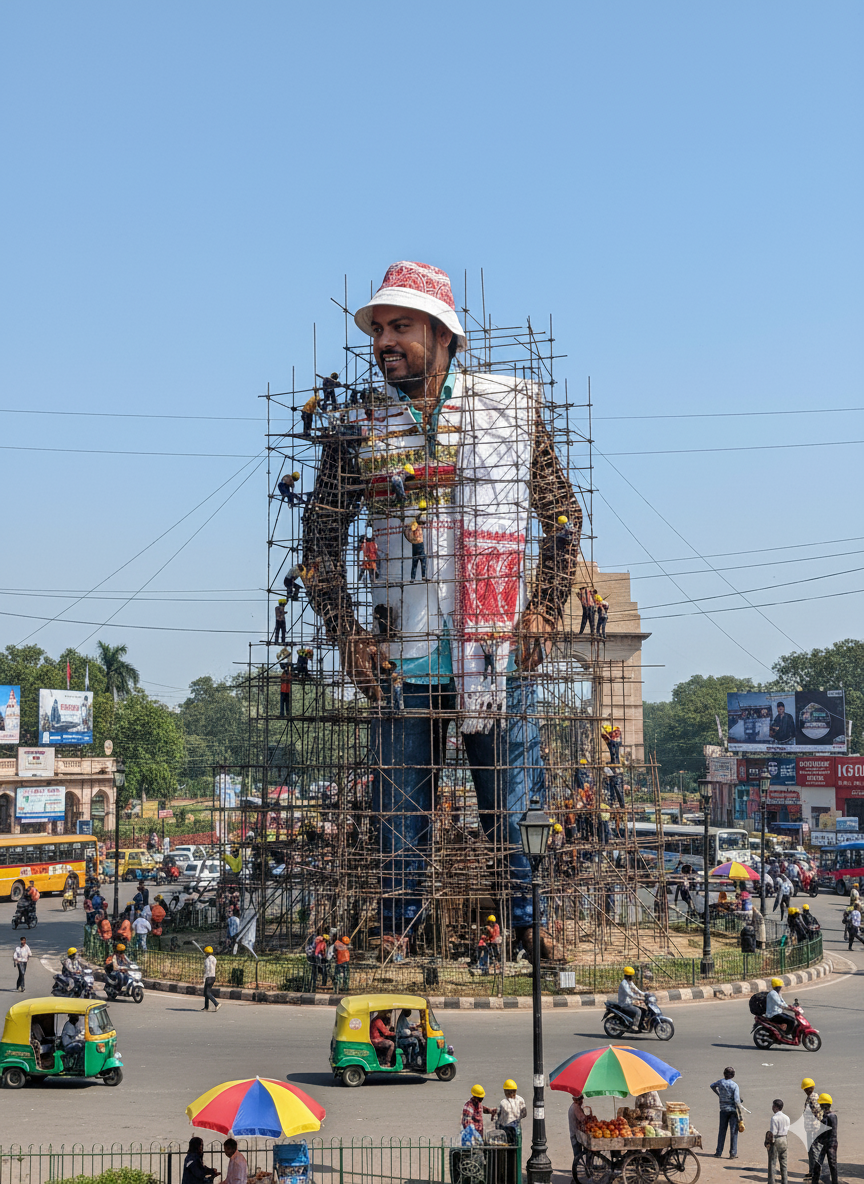
Similar to the Islamabad prompt, this one places your monumental statue in the heart of Delhi’s iconic Connaught Place, offering a different, yet equally captivating, urban vibe.
The Prompt: “Create a giant hyper-realistic statue based on the given photo, keeping the original face exactly the same without changes. The statue stands tall in the middle of a roundabout in Delhi, near a famous historical landmark. The statue is still under construction, surrounded by scaffolding… The background shows the realistic atmosphere of Connaught Place: crowded streets with colourful rickshaws, packed buses, and small cars circling the roundabout…”
Why it’s viral: The bustling, chaotic beauty of Connaught Place provides a powerful backdrop, generating curiosity and local engagement. This is a perfect use case for the Google Gemini Nano Banana model’s scene-creation abilities.
4. The Billionaire Vibe: Lamborghini Shot

Dream of luxury? This prompt places you in a high-end scenario, exuding an undeniable “billionaire vibe” with cinematic lighting and hyper-realistic detail.
The Prompt: “Make my photo an overhead high-angle 3:4 full-body shot of a man lying relaxed on the hood of a red Lamborghini Urus in a dim basement garage. Wearing a crisp white open-collar shirt, brown trousers, polished black shoes, and a leather strap watch. Tattoo visible on the forearm. Soft sunbeam lighting with natural reflections on the car, cinematic warm colour grading, shallow depth of field, creamy bokeh, hyper-realistic 8K detail, billionaire vibe.”
Why it’s viral: Luxury cars, crisp fashion, and cinematic aesthetics are social media gold. The Google Gemini Nano Banana can execute these specific details to perfection.
5. The Refreshing Romance: Beachside Portrait

Capture a moment of refreshing romance with this prompt, placing you on a breezy beachside balcony with stunning ocean views.
The Prompt: “Hyper-realistic portrait 8K. Look: Navy blue shirt, white trousers, loafers, sunglasses. Action: Adjusting his sunglasses with one hand, holding a girl in his arms. Setting: Beachside balcony with ocean waves behind. Mood: Refreshing, romantic, breezy.”
Why it’s viral: Romantic, aspirational settings always perform well. The “hyper-realistic 8K” detail combined with the specific mood creates an incredibly appealing and shareable image.
Ready to try these prompts yourself? Simply head over to Google Gemini’s image generation feature, paste your chosen prompt, and upload the photo you want to transform. Experiment with the Google Gemini Nano Banana model and see the incredible results!
Don’t forget to share your creations on Instagram and tag us with #GeminiViralPhotos – we’d love to see what you come up with!





Pingback: Kuku TV Ki Death Countdown Web Series: Full Episodes Dekhne Ki Ultimate Guide
Pingback: Death Countdown Web Series Free Mein Kaise Dekhein? (100% Safe Tareeka)
Pingback: Crorepati Dulhaniya Viralo TV Free Mein Kaise Dekhein? (Free Download)